Scheduling Do-Not-Disturb in GNOME
Do Not Disturb
GNOME has a little button that lets you turn on Do-Not-Disturb for notifications:
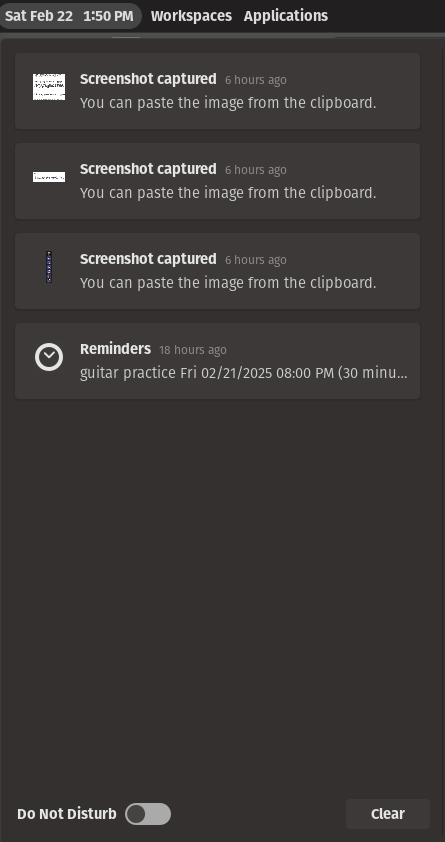
Unfortunately, it has no way of scheduling DnD.
Good news, though! It does support turning on DnD through the CLI: gsettings set org.gnome.desktop.notifications show-banners false. I put that in a script named toggle-dnd in my dotfiles:
#!/bin/sh
scheduling
I tried putting that in cron1, had a sneaking suspicion it wouldn't work, set it to run every minute, and saw this very unhelpful line of logging:
$
Feb 22 12:00:01 pop-os CRON[1623131]: (CRON) info (No MTA installed, discarding output)
Ok, fine. Let's pipe the output to the system log2, since clearly cron can't handle that itself.
* * * * * bash -lc 'org.gnome.desktop.notifications show-banners false 2>&1 | logger -t toggle-dnd'
That at least shows more useful output.
$
Feb 22 05:59:01 pop-os toggle-dnd[1376772]: /bin/sh: 1: toggle-dnd: not found
Oh right. Cron is running things with a default PATH. Technically there are ways to configure this 3, but the simple solution is just to run a bash login shell which sources all the directories i would normally have in a shell. at this point, however, it is getting somewhat annoying to test via cron, so let's replicate cron's environment:
$
$
/usr/local/sbin:/usr/local/bin:/usr/sbin:/usr/bin:/sbin:/bin
$
$
/home/jyn/Documents/node-v20.12.2-linux-x64/bin:/home/jyn/.local/bin:/home/jyn/src/dotfiles/bin:/home/jyn/.local/lib/cargo/bin:/snap/bin:/usr/games:/home/jyn/perl5/bin:/usr/local/sbin:/usr/local/bin:/usr/sbin:/usr/bin:/sbin:/bin:/snap/bin
neat. let's run make sure our command runs. before:

after running toggle-dnd in our login shell:
... nothing happened. we can confirm this on the CLI:
$
true
$
$
true
DBUS
at this point i started to get annoyed and ran systemctl --user status in hopes of writing a systemd timer instead. fortunately, i did that inside the bash login shell, which gave me this helpful error message:
$
Failed to connect to bus: $DBUS_SESSION_BUS_ADDRESS and $XDG_RUNTIME_DIR not defined (consider using --machine=<user>@.host --user to connect to bus of other user)
It turns out that both gsettings and systemctl are trying to communicate over DBUS, and DBUS is linked to your "user session", set when you login. Unsetting environment variables disables DBUS 4.
I found a helpful stackoverflow post that helps us reconnect to DBUS 5:
Let's write a little abstraction for that, too 6.
#!/usr/bin/env bash
# Run a command in an environment where DBUS commands (e.g. `systemd --user`, `gsettings`) are available
Now, finally, we can put the pieces together:
$
0 20 * * * bash -lc 'dbus-run-user toggle-dnd true 2>&1 | logger -t toggle-dnd'
0 8 * * * bash -lc 'dbus-run-user toggle-dnd false 2>&1 | logger -t toggle-dnd'
P.S.
X11
just setting up DBUS doesn't set up our X11 environment again. I didn't happen to need that. but now that we have DBUS, you can retrieve it pretty easily:
$ |
DISPLAY=:1
You can do something similar for XAUTHORITY, TMUX*, and XDG_* environment variables. Note that systemctl --user may be using a tmux session or pane that no longer exists; use caution.
why were you doing this in the first place
hahahaha so i had the foolish idea that this would get discord to silence notifications at night. it does not do that. i ended up just turning off desktop notification sounds altogether.
-
"why not a systemd user timer" because i don't know a helper that lets you write the timer schedule interactively, the way that https://cron.help/ works for crontabs, and because systemd's documentation is smeared across a ton of different man pages. cron is just
crontab -e. ↩ -
"why not set cron to automatically write output to the system log" hahahahaha there's no way to do that. unless you're using specifically
cronie, which isn't packaged in Ubuntu 22.04. ↩ -
see
man 5 crontab; also this differs depending which version of cron you have installed. this link for instance does not match the man page i have installed locally forman 5 crontab. ↩ -
it's almost like using environment variables to communicate data through a system is a bad idea! ↩
-
note that recommends using
machinectlorsystemctl --machine=$USER@localhost --userinstead. but both of those don't work in this environment:machinectlrequires interactive login, and--machinejust doesn't work at all:Failed to connect to bus: Host is downFailed to list units: Transport endpoint is not connected↩ -
This uses bash because that sets
$UIDfor us automatically. Theoretically we could do this with sh andid -u, but it's more of a pain than it's worth. ↩
Discuss on Hacker News, Lobste.rs, or Mastodon